
How Discord Server Boosts Work in 2026 (New Perks Explained)
Complete guide to Discord Server Boosts in 2026: new Additional Perks like Server Tags and Enhanced Role Styles, boost levels, allocation strategies, and tips for owners.

Discord Server Boosting has always been the main way communities unlock better audio quality, more emoji slots, and premium features. But the system got a meaningful update in 2026 that changed how boosts work—and how you should think about using them.
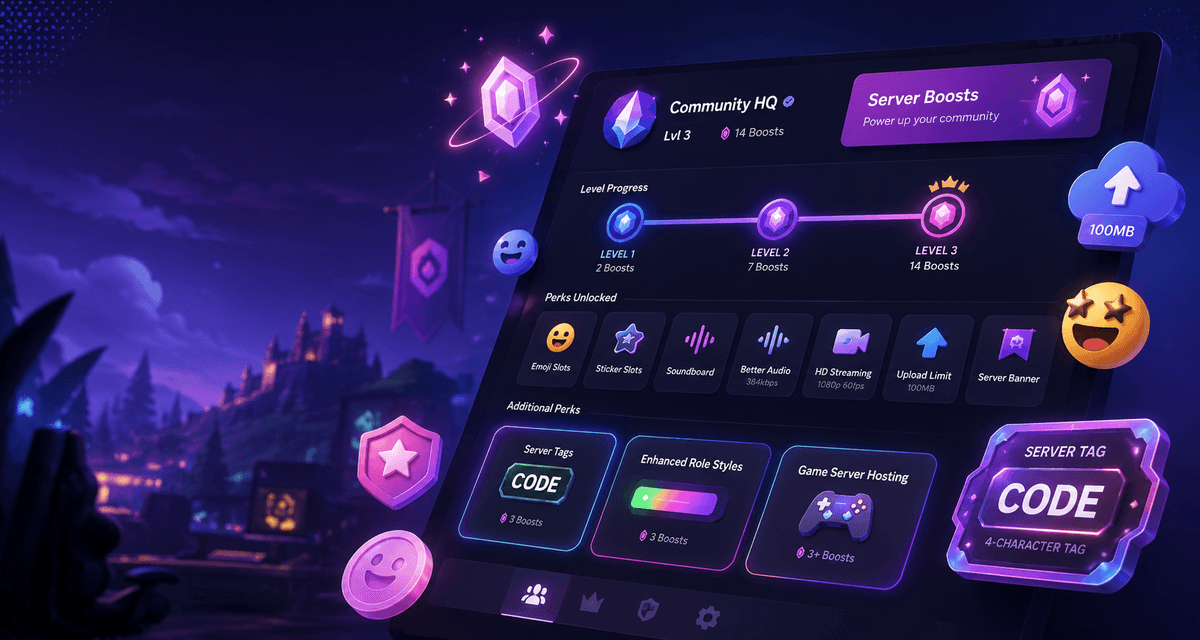
The big change? Additional Perks. Instead of boosts only counting toward server levels (1, 2, and 3), you can now dedicate boosts to specific perks like Server Tags, Enhanced Role Styles, and Game Server Hosting. These perks unlock independently of your server level, giving you more control over which features matter most to your community.
This guide covers everything you need to know about Discord Server Boosts in 2026—the levels, the new perks, how allocation works, and how to get the most value out of every boost your server receives.
How Server Boost Levels Work
Server levels remain the backbone of the boosting system. Each level requires a specific number of active boosts and unlocks a bundle of perks. The levels stack, so Level 2 includes everything from Level 1, and Level 3 includes everything from both previous levels.
Level 1 (2 Boosts)
The entry point for boosting. With just two boosts, your server gets:
- +50 emoji slots (100 total)
- +10 custom sticker slots (15 total)
- +16 soundboard slots (24 total)
- 128 Kbps audio quality
- Go Live streams at 720p 60 FPS
- Custom server invite background
- Animated server icon
Level 1 is surprisingly good value for small communities. The animated icon alone makes your server feel more polished, and the audio upgrade matters more than most people expect.
Level 2 (7 Boosts)
Everything from Level 1, plus:
- +50 more emoji slots (150 total)
- +15 more custom sticker slots (30 total)
- +12 more soundboard slots (36 total)
- 256 Kbps audio quality
- Go Live streams at 1080p 60 FPS
- 150 audience capacity for Stage Channels with video
- 50 MB upload limit for all members
- Custom role icons
- Static server banner
The 50 MB upload limit is a big deal for communities that share files regularly. Most members won’t have Nitro, so this upgrade applies to everyone in the server. Custom role icons also let you add small images to role names, which helps organize your member list visually.
Level 3 (14 Boosts)
Everything from previous levels, plus:
- +100 more emoji slots (250 total)
- +30 more custom sticker slots (60 total)
- +12 more soundboard slots (48 total)
- 384 Kbps audio quality
- 300 audience capacity for Stage Channels with video
- 100 MB upload limit for all members
- Custom invite link
- Animated server banner
Level 3 is the ceiling for server boosting. The animated banner and custom invite link are the standout perks here, but the 100 MB upload limit for everyone is quietly one of the most useful upgrades—especially for design, gaming, and content creation servers.
New in 2026: Additional Perks
The biggest update to Server Boosting is the introduction of Additional Perks. These are standalone features you can unlock with dedicated boosts, independent of your server level.
Each Additional Perk costs 3 boosts and requires those boosts to stay allocated to remain active.
Server Tags (3 Boosts)
Server Tags give your members a custom 4-character tag they can display on their profiles across Discord—not just in your server. Think of it like a clan tag in gaming or an abbreviation for your community brand.
For example, if your server is called “Creative Coders,” members could display CRCO on their profile anywhere on Discord. It’s a way for your community to represent itself across the platform, not just inside the server.
Best for: Gaming clans, brand communities, any server where members want to show affiliation publicly.
Enhanced Role Styles (3 Boosts)
Enhanced Role Styles let you apply animated gradient and holographic effects to roles, going beyond the standard solid colors Discord normally supports. Instead of a flat red or blue role name, you can have a role that shifts through a gradient or shimmers with a holographic effect.
The Server Booster role itself gets a special pink gradient by default, even without this perk unlocked. But with Enhanced Role Styles, you can apply these effects to any role in your server.
Best for: Creative communities, role-heavy servers, servers that want to reward active members with visually distinct roles.
Game Server Hosting (3+ Boosts)
Game Server Hosting lets you set up a custom game server for your community directly through Discord. The number of boosts required depends on the game and server size, but it starts at 3.
Best for: Gaming communities that want a dedicated server for their members without managing separate hosting infrastructure.
Larger File Uploads (Experimental)
Discord is currently testing an option to upgrade the file upload limit to 250 MB using 5 boosts. This is separate from the Level 2 and Level 3 upload upgrades and applies to all members. If your server handles large files—game mods, design assets, video clips—this can be a game-changer.
Best for: Design servers, modding communities, video editing groups, any server that shares large files frequently.
How Boost Allocation Works Now
This is the part most server owners need to understand. In 2026, boosts are no longer a single pool that only counts toward levels. Instead, they’re allocated in two ways:
Boosts for Server Levels
Boosts that count toward your server’s level progression (2, 7, or 14 boosts for Levels 1, 2, and 3). These determine which tier perks your server unlocks.
Boosts for Additional Perks
Boosts dedicated to specific Additional Perks like Server Tags, Enhanced Role Styles, or Game Server Hosting. These boosts do not count toward your server level.
The key rule: a boost can only do one thing. If it’s allocated to a level, it can’t also count toward an Additional Perk, and vice versa.
Strategic Allocation Examples
With 10 total boosts:
- 7 for Level 2 + 3 for Server Tags (one Additional Perk)
- 2 for Level 1 + 6 for two Additional Perks (3 each)
- 7 for Level 2 + save 3 more for a future Additional Perk
With 14 total boosts:
- 14 for Level 3 (all perks unlocked, no Additional Perks)
- 7 for Level 2 + 6 for two Additional Perks + 1 unused
- 2 for Level 1 + 9 for three Additional Perks + 3 leftover
Auto-Allocation vs. Manual Control
When new boosts hit your server, they’re automatically applied toward levels if you’re close to the next tier. Boosts for Additional Perks must be manually assigned through the Server Boost tab on desktop. As a server admin, you can reallocate boosts between levels and perks at any time through that same tab.
Just keep in mind: moving boosts away from a level triggers the grace period (more on that below), but moving boosts away from an Additional Perk disables it immediately.
What Happens When a Server Loses Boosts
If your server’s boost count drops, the consequences depend on what those boosts were supporting:
Level Perks
You get a 72-hour grace period before level perks are removed. During this time, features like the server banner, extra emoji slots, and audio quality upgrades remain active. After 72 hours, they become temporarily invalid until you regain the level.
The one exception is custom invite links—those are lost immediately and become available to other servers after 30 days.
Additional Perks
There is no grace period for Additional Perks. If boost allocation drops below 3 for a perk, it’s disabled instantly. Enhanced Role Styles revert to solid colors, and Server Tags disappear from member profiles.
This makes it important to prioritize. If your server is losing boosts, decide which perks matter most and allocate remaining boosts accordingly through the Server Boost tab.
Practical Advice by Server Type
Gaming Servers
Prioritize Level 2 (128 kbps → 256 kbps audio, 1080p 60 FPS streaming). If you have extra boosts, Game Server Hosting or Server Tags (for clan identification) add more value than pushing to Level 3.
Creator Communities
Level 3 is worth the push for the animated banner and custom invite link. Enhanced Role Styles let you create visually distinct tiers for subscribers or patrons. The 100 MB upload limit also helps when sharing assets.
Study and Student Servers
Level 1 covers the essentials. Animated icon, better audio, and 720p 60 FPS streaming are plenty for study groups. If you have spare boosts, Larger File Uploads (when available) are more useful than vanity perks like Server Tags.
Streaming Communities
Level 2 is the sweet spot. 1080p 60 FPS Go Live streams and 150 audience capacity for Stage events cover most needs. Server Tags let regular viewers show affiliation across Discord, which builds community identity.
Are Discord Server Boosts Worth It?
It depends on your server’s size and goals.
For a server with 50–100 active members, Level 1 (2 boosts) is cheap and delivers real quality-of-life improvements—animated icon, better audio, more emoji space. Two Nitro subscribers can cover this themselves.
For medium servers (500–2,000 members), Level 2 (7 boosts) is the practical ceiling. The 50 MB upload limit, 1080p streaming, and custom role icons make a noticeable difference. Additional Perks like Server Tags can help with community branding.
For large servers (5,000+ members), Level 3 (14 boosts) makes sense if you need the 100 MB upload limit, animated banner, and custom invite link. But you should weigh whether 7 boosts for Additional Perks would serve your community better.
The new system actually gives server owners more reason to boost strategically. Before 2026, every boost beyond Level 3 was essentially wasted. Now you can funnel extras into perks that directly benefit your community.
Comparison Table
| Level | Boosts Required | Key Perks |
|---|---|---|
| Level 1 | 2 | Animated icon, 128 kbps audio, 720p 60 FPS, 100 emoji slots, 15 stickers |
| Level 2 | 7 | All Level 1 perks + 256 kbps audio, 1080p 60 FPS, 150 emoji, 50 MB uploads, role icons, static banner |
| Level 3 | 14 | All previous perks + 384 kbps audio, 250 emoji, 100 MB uploads, animated banner, custom invite link |
| Server Tags | 3 | 4-character tag on member profiles across Discord |
| Enhanced Role Styles | 3 | Animated gradient and holographic role effects |
| Game Server Hosting | 3+ | Custom game server for the community |
| Larger File Uploads | 5* | 250 MB upload limit for all members |
*Experimental — may not be available on all servers.
FAQ
How many boosts are needed for Level 3?
14 boosts. Level 3 is the highest server level and includes all perks from Levels 1 and 2.
Do additional perks count toward server levels?
No. Additional Perks use dedicated boosts separate from those allocated to server levels. If you have 3 boosts allocated to Server Tags, those 3 boosts do not count toward your Level 1, 2, or 3 progress.
What happens if a server loses boosts?
For level perks, you get a 72-hour grace period before features are removed. For Additional Perks, the perk is disabled immediately. Custom invite links are lost right away and become available to other servers after 30 days.
Can boosts be transferred?
Yes, but there’s a 7-day cooldown after boosting a server before you can transfer the boost to another server. You can transfer through User Settings > Server Boost tab.
Does Nitro Basic include boosts?
No. Nitro Basic does not include any server boosts. Only full Nitro subscribers get 2 free server boosts per month. Nitro Classic and full Nitro subscribers also get a 30% discount on additional boost purchases.
Can I reallocate boosts after assigning them?
Yes. Server owners and admins can reallocate boosts between levels and Additional Perks through the Server Boost tab on desktop. Moving boosts away from a level triggers the grace period. Moving boosts away from an Additional Perk disables it immediately.
Can Additional Perks be purchased on mobile?
Not yet. Additional Perks can only be enabled and configured on the Discord desktop app at this time.
Are Additional Perks a one-time purchase?
No. Each Additional Perk requires its 3 boosts to remain allocated indefinitely. If the boosts are removed or the server loses them, the perk is disabled until the boosts are restored.
Summary
The 2026 Discord Server Boosting update gives communities more flexibility than ever. Instead of boosts only counting toward rigid level thresholds, you can now pick and choose which perks matter most to your server.
Level 2 (7 boosts) remains the practical sweet spot for most communities—good audio, 1080p streaming, and upload upgrades for everyone. Additional Perks like Server Tags and Enhanced Role Styles fill in the gaps for servers that want branding or visual flair without pushing to Level 3.
If your community is actively boosting, take a few minutes to check the Server Boost tab and see whether your current allocation makes sense. With the new system, a little strategic thinking can go a long way.
And if you’re looking for ways to earn Discord Nitro without paying monthly, NitroLoot lets you complete tasks and surveys to earn rewards—including the Nitro subscriptions that come with server boosts.
Share this article
Related Articles
Discord Image Sizes: PFP, Banner, Emoji & Icons
Find the correct Discord image sizes for profile pictures, banners, server icons, emojis, stickers, role icons, and invite backgrounds without blurry crops.
How Discord Server Tags Work in 2026
Discord Server Tags explained for 2026: how tags work, boost requirements, Additional Perks, badge packs, setup steps, limits, and FAQs.