
How NitroLoot Visa Prepaid Cards Work
Learn how NitroLoot's Tremendous Visa Prepaid cards work, where to use them, key restrictions, and simple ways to spend every dollar safely.

A Visa reward is one of the most flexible things you can withdraw from NitroLoot. It is not locked to Discord, one game, or one store. But it is also not the same as cash, a normal debit card, or a physical gift card you can throw in your wallet.
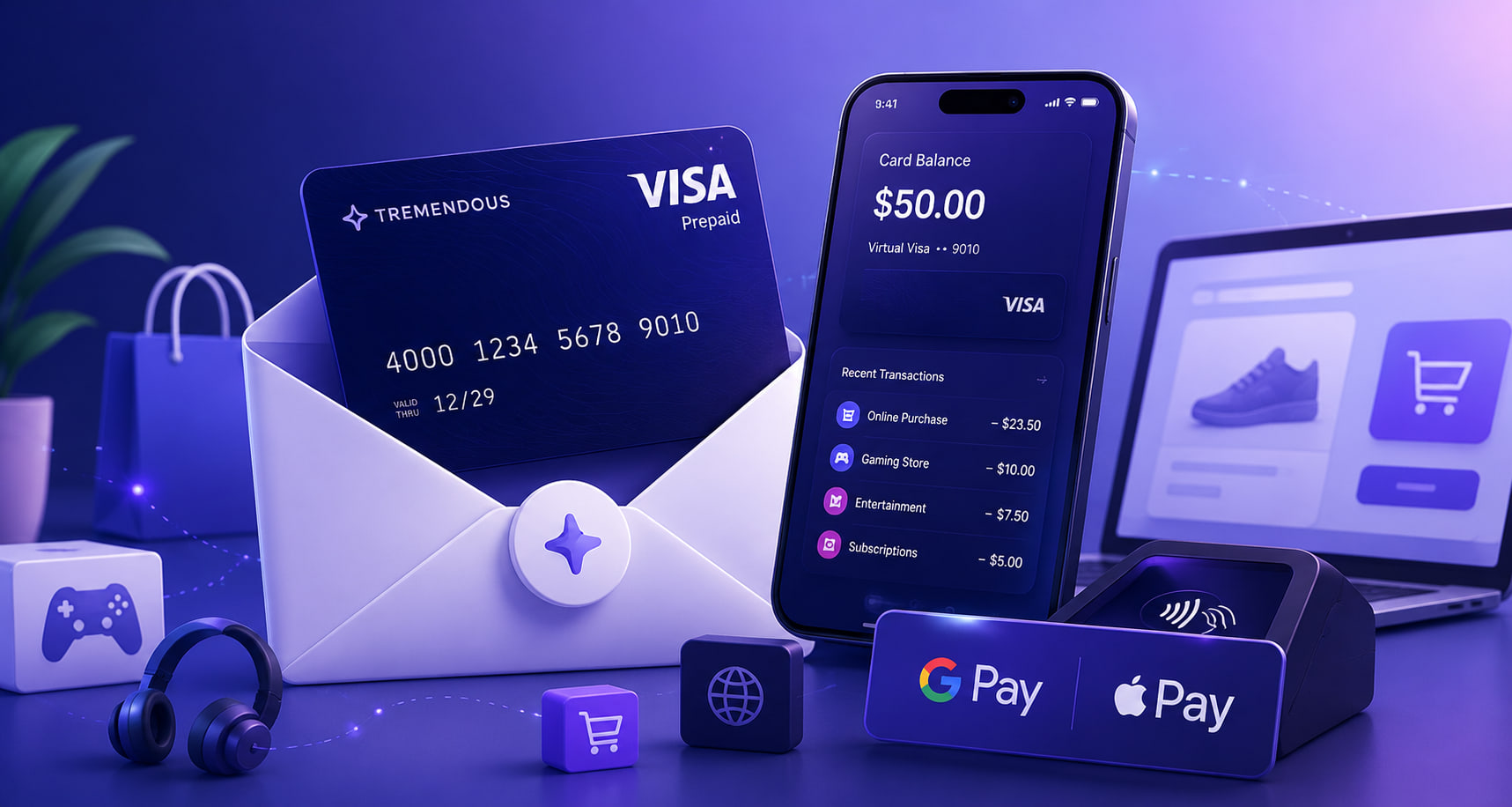
NitroLoot Visa withdrawals are fulfilled by Tremendous as a virtual Visa Prepaid card. That means the card lives behind a secure link sent to your withdrawal email. You get a card number, expiration date, CVV, balance, and transaction history, then use it for eligible purchases.
This guide explains the part people usually learn only after a declined payment: where the card works best, what Tremendous blocks, how to use it in a shop, and how to avoid stranding a tiny balance.
The short version
After a NitroLoot Visa withdrawal is approved and fulfilled, look for an email from rewards@reward.tremendous.com. Use the Redeem or card link in that email to access your virtual card. The card page shows the 16-digit number, expiry date, CVV, available balance, and transaction history.
For an online checkout, choose credit as the payment type and enter those details like you would with a normal card. For an in-person purchase, first add the card to Apple Pay or Google Wallet, then tap to pay and choose credit if the terminal asks. The virtual card itself is not a piece of plastic, and a printed card number will not work at a physical till.
The smart rule is simple: use it for a normal purchase that costs at or below the balance, not for cash, subscriptions, gambling, crypto, or a purchase that will place a large temporary hold.
What you receive from NitroLoot
NitroLoot offers Visa reward amounts from $5 to $100. Once fulfilled, Tremendous delivers the reward by email rather than mailing a physical card.
The card page is the home base for your reward. Keep the email and do not share its link. From that page, you can:
- View the card number, expiry date, and CVV
- Check the available balance before paying
- Review transaction history
- Add the card to a compatible digital wallet
- Check the card terms, including the expiry date and any fee information that applies to your card
Quick tip: search your inbox, spam, and promotions folders for
rewards@reward.tremendous.combefore assuming a Visa withdrawal did not arrive. Do not trust a random “claim your Visa” DM or lookalike email.
For the bigger picture of earning toward any NitroLoot reward, our simple daily rewards routine is a good place to start.
Where the virtual Visa works best
Tremendous says its Virtual Visa Prepaid cards can be used in 212 countries and regions wherever prepaid cards are accepted, subject to the restrictions below. The balance is held in USD. When you pay in another currency, the purchase converts at the current exchange rate and Tremendous does not charge a foreign-transaction fee.
In real life, the easiest use is usually a straightforward online purchase from a merchant that accepts prepaid Visa cards. Think game purchases, digital stores, clothing, food delivery, or an everyday item you were already planning to buy. A virtual Visa is especially handy when the purchase total is known upfront and is less than your remaining card balance.
It can also work in person after you add it to Apple Pay or Google Wallet. Ask the cashier to run it as credit, then tap your phone. Some merchants choose not to accept prepaid cards, so Visa acceptance alone is not a promise that every checkout will work.
For UK, French, and German users, Tremendous specifically notes that the local Amazon sites frequently reject prepaid-card transactions. Use another merchant instead rather than repeatedly trying the same payment.
Good ways to plan a purchase
A little planning prevents most awkward declines:
- Check your live balance on the card page immediately before checkout.
- Keep the purchase total below the balance, including tax, shipping, and any applicable tip.
- For an in-store purchase, ask whether the cashier can run a split payment for the exact remaining card balance, then pay the rest another way.
- For an Amazon.com balance of $5 or more, Tremendous documents a way to add the card balance to your Amazon account. This is an option for U.S. Amazon users, not a universal workaround. Amazon in the UK and Europe often rejects these prepaid-card transactions.
- Use the card sooner rather than treating it as a savings account. Check the expiry date and terms on your own card page.
The restrictions that matter most
This is an unrestricted everyday Visa reward, not a cash-out method. Tremendous blocks certain merchant categories and transaction types. Trying to route around those rules is a fast route to a decline, so it is better to choose a normal purchase from the start.
No cash access, transfers, or crypto
You cannot withdraw cash at an ATM or ask for cash back at a register. You also cannot move the balance to your bank, PayPal, Venmo, Cash App, Zelle, or a similar account. Money transfers, money orders, non-financial money services, and cryptocurrency purchases are prohibited.
If a checkout offers “debit,” a PIN, or cash back, choose credit and decline the cash-back option. Virtual Visa cards do not have a PIN, and a debit-style cash transaction can be declined.
No subscriptions, bills, or installment plans
Recurring subscriptions, installment payments, and bill payments are blocked. That includes the tempting “I’ll just use it for one month” plan for a service that automatically renews. It can decline even if the first charge seems like it should fit.
Use the card for a one-time purchase instead. If you are saving NitroLoot rewards specifically for Discord, compare the reward with the perks first in our guide to whether Discord Nitro is worth it.
For a normal bank card, PayPal, wallet, gift balance, or Nitro trial that fails inside Discord, follow the separate Discord Nitro payment troubleshooting guide. It explains billing-address checks, pending authorizations, supported regional methods, and when the bank needs to intervene.
Merchant categories that are blocked
Tremendous prohibits purchases involving:
- Money transfers and securities brokers or dealers
- Cryptocurrency and other non-financial money services
- Firearms, tobacco, marijuana-related businesses, and outbound telemarketing
- Dating services and massage parlors
- Government-owned lotteries, gambling, betting, casino gaming, and horse or dog racing
Mobile games can occasionally be classified as betting based on the game type, so a purchase in one of those apps may not work. Charity donations are also treated as cash-equivalent and declined through the card. If donating is your goal, Tremendous offers charity reward options separately, but a NitroLoot Visa card should be spent on a regular eligible purchase.
Purchases that can surprise you
Some transactions are technically ordinary purchases but are a poor match for a small prepaid card.
Pay-at-the-pump gas is restricted because stations often place a preauthorization hold that is higher than the fuel you buy. If you want to use the card for fuel, go inside and ask the cashier to prepay a fixed amount as credit.
Hotels and rental cars can place a temporary hold equal to the purchase plus 20% for incidentals. Tremendous says that hold can take up to 30 days to release once the merchant finalizes the charge. With a limited reward balance, it is much safer to use another card for these bookings.
A purchase larger than your balance will normally decline. The card does not automatically take the remaining amount from another payment method online. In a physical shop, a cashier may be able to split the total, but ask before tapping your phone.
Returns need to be handled by the merchant that sold the item. A refund sent back to the prepaid card can take seven to ten business days after the merchant issues it. Keep the card link until a return is fully settled.
Tips for spending every dollar
Small balances are where prepaid cards get annoying. The fix is not a sketchy “card-to-cash” website. It is choosing a checkout that supports the balance you actually have.
- Use the exact balance in person. Check the balance, tell the cashier the exact amount to put on the card, and pay the rest another way. This is called a split transaction.
- Avoid checkout surprises. Tax, delivery, service fees, and tips count. Leave a little room if the final total is not fixed.
- Use a digital wallet before going to a shop. Add the card while you still have the email open and use credit at the terminal. Do not expect the cashier to key in a printed virtual-card number.
- Do not combine cards on Tremendous. These cards are not reloadable, and multiple card balances cannot be merged into one Tremendous card. Spend them separately or use a supported merchant balance option where available.
- Save the card email until the balance is zero. It is the route back to your balance and transaction history. If a purchase looks wrong, those details make it much easier to explain what happened.
Quick tip: for a $5 card, a digital purchase priced at $4.99 can still fail once tax is added. Check the final payment screen, not just the item price.
What to do if a payment is declined
A decline does not automatically mean your NitroLoot withdrawal is broken. Work through the boring checks first:
- Confirm the card has been redeemed and check its available balance.
- Make sure the final total is no more than the balance.
- Choose credit, not debit, and do not request cash back.
- Check whether the merchant is a subscription, cash-equivalent, betting, crypto, or other restricted category.
- Try a different eligible merchant if the store does not accept prepaid cards.
- If you are outside the U.S., remember that exchange-rate movement can slightly change the local-currency amount your USD balance covers.
If an eligible merchant still refuses the card, Tremendous says it may be able to exchange the prepaid card for a gift card. Contact Tremendous through its official support route and use the reward details from your card email. For a NitroLoot withdrawal status issue before the card is delivered, contact NitroLoot support instead.
Never post your full card number, CVV, or reward-link URL in a Discord server or support ticket. For the wider safety habits that keep gaming and reward accounts safe, read our account safety guide.
Final takeaway
NitroLoot Visa cards give you flexibility, but the best experience comes from using them like a one-time prepaid spending card, not like cash.
- Use the Tremendous email link to access the virtual card and check its balance.
- Choose a normal, one-time purchase that is at or below the available balance.
- Use Apple Pay or Google Wallet for in-person purchases and select credit.
- Avoid cash access, transfers, crypto, subscriptions, gambling, gas-pump holds, and hotel or rental-car holds.
Earn your reward carefully, spend it deliberately, and you will get the full value without letting a $2.17 leftover balance become a tiny digital ghost haunting your inbox.
Sources checked
Share this article
Related Articles
Best Get Paid To Sites in 2026
Compare the best get paid to sites in 2026 for surveys, games, app offers, gift cards, PayPal rewards, Discord Nitro, and gamer-friendly payouts.
Best NitroLoot Offers for Beginners
Learn which NitroLoot offers beginners should try first, how to compare surveys, games, apps, and trials, and how to avoid wasted time.