
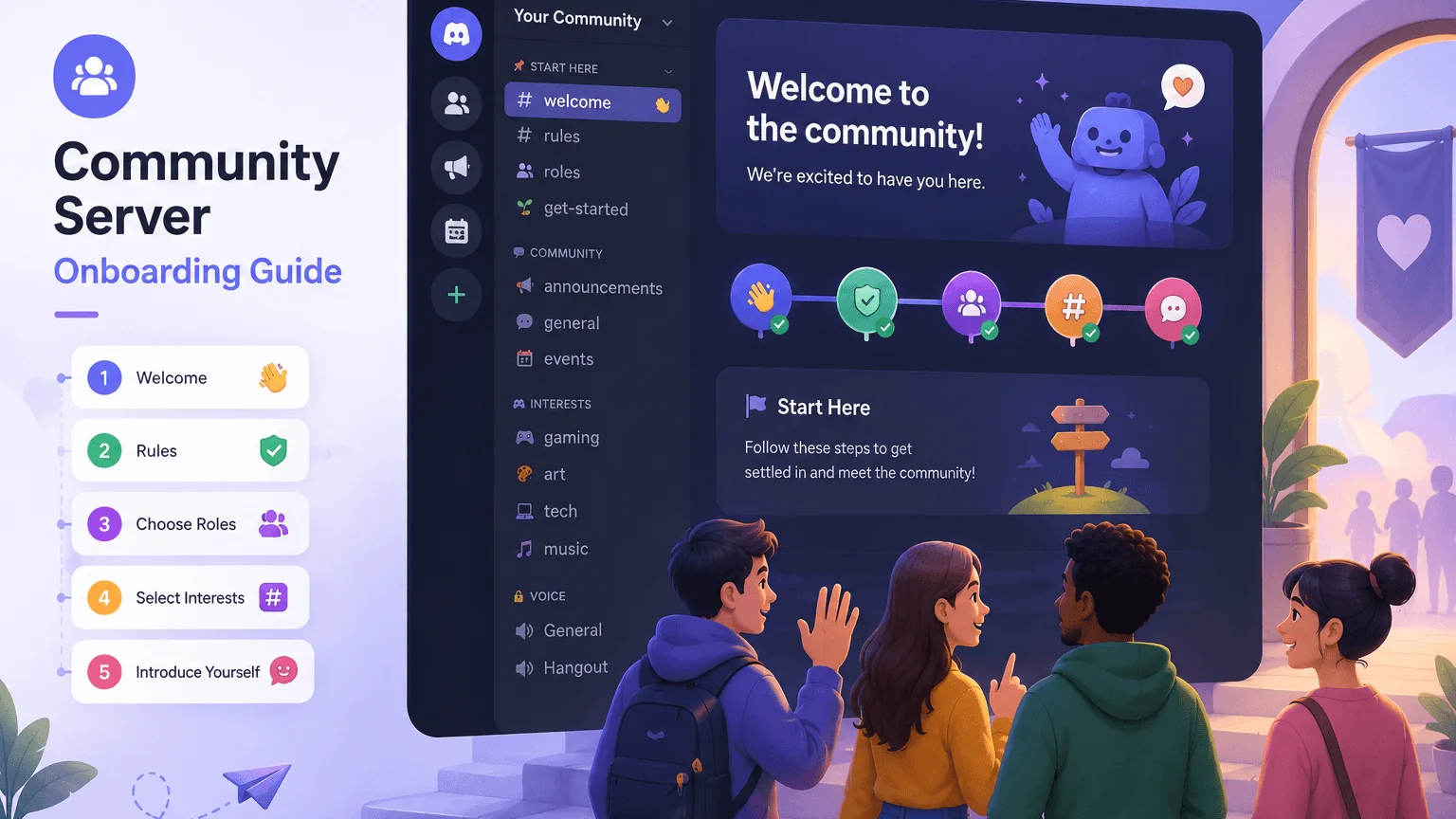
Discord Community Server Onboarding Guide
Build a better Discord server onboarding flow with clearer welcome steps, channel choices, rules, roles, and first-day member prompts.

Most community servers do not lose new members because the topic is bad. They lose them because the first five minutes are confusing.
Someone joins, sees too many channels, does not know where to talk, skims a wall of rules, and leaves before anyone notices. Or they pick the wrong role, miss the active channels, and assume the server is dead.
Good onboarding fixes that without turning your server into a form. It gives new members a small, obvious path: understand the server, choose what they care about, land in the right channels, and have one easy thing to do first.
This guide is for Discord community owners, moderators, gaming groups, study servers, creator communities, and reward communities that want more new members to actually stay.
Quick Answer: What Good Onboarding Does
A strong community server onboarding flow should answer five questions for a new member:
- What is this server for?
- What rules or norms do I need to know before talking?
- Which channels matter to me?
- What role or interest choices should I pick?
- What is the easiest first message or action?
Discord’s own Community Onboarding FAQ describes onboarding as a way for members to choose roles and channels through simple questions. Discord’s Server Guide FAQ explains the next layer: a dedicated place for a more customized welcome experience after someone joins.
That split is useful:
- Onboarding questions route people to relevant channels and roles.
- Server Guide explains what to do next.
- Rules or safety setup sets expectations before someone jumps in.
- Human welcome habits make the server feel alive.
The best setup is usually not the biggest setup. It is the clearest one.
Start With the Member’s First Minute
Before touching settings, imagine a new member who knows nothing about your server. They found an invite from a friend, a listing site, a video description, or a social post. They are curious, but not committed yet.
In the first minute, they are scanning for signals:
- Is this server active?
- Is it safe to talk here?
- Are people like me already here?
- Do I need to read 20 channels before posting?
- Will I look awkward if I say hello?
If the answer feels unclear, they may lurk forever or leave quietly.
A simple first-minute flow might look like this:
- They accept the rules.
- They answer two or three interest questions.
- They land in a small set of default channels.
- They see one welcome page with the server’s purpose and best next step.
- They are invited to post an easy intro, vote in a poll, join an event, or pick a starter role.
The point is not to explain every feature. The point is to remove doubt.
For server owners still working on the larger growth loop, pair this with our guide on how to grow your Discord server. Growth brings people in. Onboarding decides whether they stay.
Keep Default Channels Small
Default channels are the channels everyone sees after joining. Discord recommends using the most valuable channels new members should have in their list, not every channel that exists.
That matters because too many default channels creates instant noise. A new member should not need to understand your entire server architecture on day one.
For many communities, a good default set is:
- One welcome or start-here channel
- One rules or safety channel
- One announcements channel
- One main chat
- One help or questions channel
- One event or updates channel
Then use onboarding questions to reveal the rest.
For example, a gaming community might ask:
- What games do you play?
- Are you looking for casual groups, ranked teams, or event nights?
- Do you want platform-specific channels?
A study server might ask:
- What subject are you working on?
- Do you want accountability rooms, resource channels, or voice study sessions?
- What time zone or region fits you best?
A creator server might ask:
- Are you here for art, editing, streaming, writing, or feedback?
- Do you want showcase channels or critique channels?
- Do you want event notifications?
The goal is not to collect data. The goal is to prevent channel overload.
Quick tip: if a channel is not useful to almost every new member, it probably should not be a default channel.
Ask Fewer, Better Onboarding Questions
Onboarding questions should feel like a shortcut, not an application form.
Discord’s Community Onboarding Examples show the basic pattern: members answer questions, and those answers can connect them to relevant channels or roles. The mistake many servers make is treating this like a profile quiz.
A good onboarding question has a practical result. If the answer does not change what the member sees or receives, you may not need to ask it.
Useful question types include:
- Interest questions: “What topics do you want to see?”
- Activity questions: “What do you want to do here?”
- Notification questions: “Which event pings do you want?”
- Experience questions: “Are you new, casual, advanced, or looking to help?”
- Region or schedule questions: “Which time zone works best for events?”
Weak question types include:
- Questions that exist only because they seem fun
- Questions with ten nearly identical answers
- Questions that assign roles nobody uses
- Questions that reveal empty channels
- Questions that make people choose before they understand the server
Keep the first pass to two or three questions. If your server is large, you can add optional questions later, but the first experience should be quick.
Make Rules Short Enough to Follow
Rules are part of onboarding too. If members cannot understand the rules quickly, they will either ignore them or be afraid to talk.
Discord’s Community Guidelines cover platform-wide expectations, but your server rules should explain the local norms: what counts as spam, how self-promo works, what channels are for, how moderation handles conflict, and what behavior gets removed.
Good server rules are:
- Specific enough to enforce
- Short enough to read
- Written in normal language
- Connected to moderator action
- Easy to find after onboarding
Instead of:
Be respectful.
Try:
Do not harass, threaten, dogpile, or follow arguments across channels. If a mod asks you to stop, stop.
Instead of:
No spam.
Try:
Do not flood chat, mass ping roles, repeat the same message, or post invite links outside approved channels.
Rules should protect normal members, not show off how strict the server is. If your server needs a deeper safety pass, use our Discord server permissions audit checklist after the onboarding flow is stable.
Build a Server Guide That Answers “Now What?”
Onboarding gets someone into the right place. Server Guide should help them know what to do next.
A useful Server Guide is not a second rules page. It is a short map of the community. Think of it as the lobby sign at an event: here is where to start, here is where to ask for help, here is what happens every week.
Good Server Guide sections include:
- A short welcome message
- The server’s purpose in one or two sentences
- Best channels for new members
- How events or game nights work
- How to get help from moderators
- A reminder about notification or interest roles
- One first action
That first action matters. New members often need permission to participate. Give them something low-pressure:
- “Post your current game in main chat.”
- “Drop one goal for the week.”
- “Vote in the next event poll.”
- “Pick your platform role.”
- “Share one clip or screenshot.”
If your community runs activities often, link onboarding to recurring events. Our online game night ideas guide has formats that work well as first-week community events because they are low friction and easy for mixed groups.
Design Roles Around Behavior, Not Decoration
Roles can make onboarding feel personal, but they become messy fast when every tiny preference gets a role.
Before adding a role, ask what it does:
- Does it unlock channels?
- Does it control notifications?
- Does it help moderators understand support needs?
- Does it help members find people with shared interests?
- Does it create a status people actually care about?
If the role does none of those things, it may just clutter the member list.
Interest roles are usually worth it when they connect to channels or events. Notification roles are worth it when members can opt into pings they genuinely want. Status roles can work, but they should not make new members feel like outsiders.
Avoid role systems that create pressure before someone has participated. A new member should not land in a server and immediately feel like they are at the bottom of a hierarchy.
For communities that use rewards, keep them tied to healthy participation instead of spam. Our guide to Discord server reward ideas explains how to reward activity without turning chat into a point farm.
Test Onboarding Like a New Member
After setup, do not assume the flow works. Test it.
Use a spare account if appropriate, or ask a trusted moderator who has not been staring at the settings for an hour. Walk through the server as if you know nothing.
Check these details:
- Are the rules visible before someone talks?
- Do onboarding questions make sense without context?
- Do selected answers reveal the correct channels?
- Are default channels useful and not overwhelming?
- Does the Server Guide tell people what to do first?
- Are important channels hidden by accident?
- Are muted or archived channels being shown too early?
- Can a new member find help without pinging random people?
Then watch real behavior for a week. Do new members say hello? Do they pick roles? Do they ask the same question repeatedly? Do they join events? Do they disappear after onboarding?
Those signals are more useful than guessing.
Common Onboarding Mistakes
The biggest onboarding mistakes usually come from trying to be complete instead of clear.
Too many channels too soon: New members do not need every archive, bot log, partner channel, and niche topic on day one. Reveal channels as they become relevant.
Questions with no payoff: If a question does not change roles, channels, notifications, or next steps, remove it.
Rules written for moderators, not members: Rules should be easy for normal people to understand. Keep private enforcement details in mod docs.
Dead channels in the first view: Showing inactive channels early makes the whole server feel inactive. Put your alive spaces first.
No first action: A beautiful onboarding flow still fails if members do not know what to do after completing it.
Over-automating warmth: Bots and setup tools help, but a human reply to a first message is still one of the strongest retention tools a community has.
A Simple Onboarding Template
If you want a clean starting point, use this structure:
Default channels
start-hererulesannouncementsmain-chathelp-desk
Question 1: What are you here for?
- Chat and hang out
- Find people to play with
- Join events
- Learn or ask questions
- Share creations
Question 2: Which topics do you want?
- Game channels
- Study or productivity
- Art and media
- Tech or coding
- Rewards and events
Question 3: Which pings do you want?
- Event pings
- Giveaway pings
- Update pings
- No optional pings
Server Guide
- One short welcome
- One “how this server works” section
- Three useful links or channels
- One first action
- One support/mod contact path
That is enough for most servers to start. You can refine from there based on what new members actually do.
Final Takeaway
Good onboarding is not about making your server look big. It is about making the first visit feel obvious.
Keep the path short, route people by real interests, show only the channels that matter early, and give every new member one easy first action. If the first five minutes feel calm and clear, the rest of your community has a much better chance to do its job.
Start with two questions, five default channels, one Server Guide, and one weekly review. That is a stronger foundation than a giant role menu nobody understands.
Share this article
Related Articles
How to Grow Your Discord Server in 2025: A complete Guide
Learn the best strategies to grow your Discord server in 2025. From listing websites like Astrocord to community engagement, discover how to gain members fast.
Discord Server Listing Sites: Which Ones Matter?
A practical guide to Discord server listing sites, when to use them, how to write better listings, and how to avoid low-quality growth.