
How to Get Free Discord Profile Decorations
Learn how to get free Discord decorations through Quests, Orbs, gifts, and rewards. Check eligibility, expiry, and how to apply your item after claiming it.

The first place to check for free Discord decorations is Discover > Quests. Look for a cosmetic reward or Orbs you can spend on an eligible Shop item. Claiming a reward and applying it to your profile are separate steps, and some rewards expire.
That is still enough to build a great profile. The trick is choosing the method that matches the cosmetic you want instead of chasing “free decoration codes” that do not exist.
This guide helps you choose a route, check its restrictions, and equip the item afterward. It also covers gifts, promotions, and third-party rewards when your current Quests do not match your goal.
The Best Free Method for Each Goal
| Your goal | Best place to start | Main limitation |
|---|---|---|
| Any eligible Shop cosmetic | Discord Quests and Orbs | Shop selection and Quest availability change |
| A branded or limited cosmetic | Official Quest or promotion | Short claim window and eligibility rules |
| A specific current Shop item | Check its Orb eligibility, then available reward or gift options | The item must accept your chosen payment or reward route |
| A Profile Frame | Check the item’s listing and the dedicated Frames FAQ | Early Access and Orb rollout restrictions may apply |
| A surprise cosmetic | Trusted community giveaway | Luck and scam risk |
No method guarantees a particular item. Before starting a long Quest or offer, open the Discord Shop and confirm that the cosmetic is still available, what it costs, and which payment methods it accepts.
First, Know Which Decoration You Want
Discord’s collectible names describe different parts of the profile:
- Avatar Decorations add artwork or animation around your profile picture.
- Profile Effects animate the profile when somebody opens it.
- Nameplates add a styled design behind your display name.
- Profile Frames create a decorative border around the whole profile card.
The Profile Frames FAQ, checked on September 19, 2026, still lists Nitro Early Access and excludes Orb purchases. Do not treat its estimated rollout window as a confirmed release date; check the current listing before choosing a frame as your target.
If those differences are unclear, start with our complete Discord profile decorations guide. It also explains which custom-profile features come from Nitro rather than the Shop.
1. Complete Discord Quests That Reward Cosmetics
Discord Quests are the official starting point. A Quest can ask you to play or stream an eligible game, watch a video, or complete another clearly described activity. The reward may be a specific cosmetic, extended access to one, or Orbs.
On desktop or browser, open Discover > Quests. On mobile, Quest access may appear through Settings or your Orbs balance. Accept the Quest before doing the activity, check the eligible device, and claim the reward before its deadline.
Quest availability varies by account, region, age, device, and campaign. You may see different Quests from a friend, and there may be weeks when none match your goal.
Before accepting, check:
- The exact task and completion time
- Whether the reward is Orbs or a named cosmetic
- Whether access is permanent or extended for a stated period
- The expiration date for completing and claiming it
- Whether desktop, console, or mobile activity is required
If a website claims it can add a past Quest reward after the campaign ended, avoid it. Real Quest progress and rewards appear in Discord.
After completing the task, select Claim Reward. Discord’s Quests FAQ says Discord cosmetics and Orbs are added to your account after claiming. Partner-game rewards can instead provide a redemption code, so read what the Quest actually awards.
2. Earn Orbs and Shop Select Items
Orbs are Discord’s account-bound reward currency. Eligible Quests award them, and selected items in the Discord Shop accept them.
Current Orb options can include Avatar Decorations, Profile Effects, Nitro Credits, the Orbs badge, and selected items from the main Shop collection. Orbs cannot be used for every item, gifts, partner-branded collectibles, recurring Nitro, or Server Boosts.
Open the item’s detail page to check both payment options. Discord’s Shop FAQ says eligible items show money and Orb prices. Seeing a cash price while browsing is not enough to conclude that Orbs cannot be used.
A sensible Orbs strategy
- Browse the current Orb-eligible collection before choosing a target.
- Complete only Quests that fit your device and normal activity.
- Claim earned Orbs before the Quest closes.
- Keep your balance for an item you actually like instead of spending just because something is available.
- Preview the item with your current avatar and profile colors.
Orbs do not transfer between accounts or convert to cash. They are best for users willing to wait for the right Quest and Shop item. Our Discord Orbs guide covers the current earning and spending flow in detail.
Plan around the remaining balance, not a promised number of Quests. For example, if an item cost 4,000 Orbs and you had 1,500, you would need 2,500 more. Those are example numbers, not current Shop prices. Compare the actual shortfall with the rewards available to your account, and avoid assuming tomorrow’s Quest will pay the same amount.
3. Check NitroLoot Rewards When Official Options Do Not Fit
If no suitable Quest is available, NitroLoot offers surveys, games, and app tasks that can earn reward value. This is a separate third-party route, not an official Discord Quest or a way to create Orbs.
Check the available redemption catalog before starting. Confirm that the reward covers the exact cosmetic or a payment method accepted for it. Do not assume that Nitro credit, a prepaid card, and a Shop item can be exchanged for one another.
Offer availability varies by account and region. Read the required milestone, device restrictions, tracking rules, and deadline. Save the terms before installing anything, and account for the stated crediting time. A large reward is not necessarily better if it requires much more time or a purchase you did not plan to make.
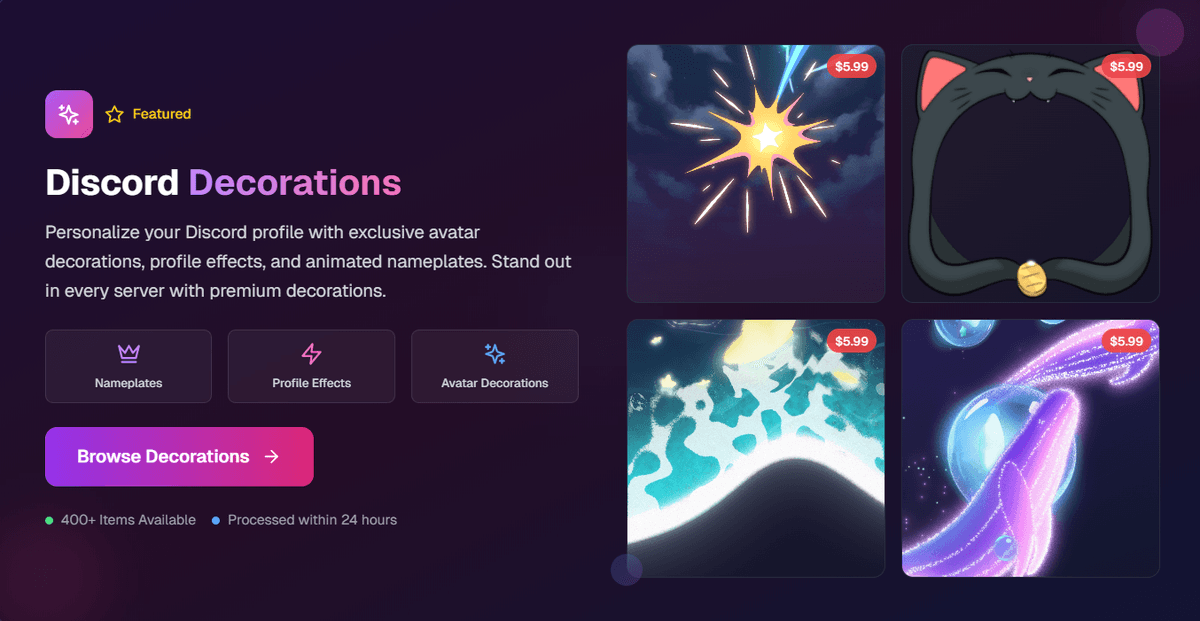
The screenshot is an illustration of the catalog, not a guarantee of today’s stock or prices. Use the current options shown in your account. Our NitroLoot offers guide explains how to choose a manageable first task.
4. Watch for Official Promotions and Limited Claims
Some cosmetics arrive through game launches, Discord events, and partner campaigns. They can be especially appealing because the item may not be sold in the normal Shop.
The downside is timing. Promotions can be limited by region, platform, account eligibility, and claim date. Some rewards also have a fixed period of use rather than permanent ownership.
Use the announcement’s official link, then read the terms for:
- The country and account requirements
- The activity or purchase required
- The claim and redemption deadlines
- Whether the cosmetic is permanent or time-limited
- Whether Nitro is required to use it afterward
Check Discord’s Quests page, Shop, official blog, and verified social accounts. Avoid “archive” pages promising expired codes; a list can rank in search long after every code on it has stopped working.
5. Accept Gifts Carefully
Discord allows users to gift eligible Shop items. A friend may also give you a Discord gift card or another supported reward you can use toward a cosmetic. Gift cards have country, account-balance, and checkout rules, so confirm the recipient can redeem one before buying it.
A real gift should not require your Discord password, token, backup code, downloaded program, browser extension, or QR-code login. If a claim link is posted in a public channel, another person may reach it first. Ask the sender to use a direct message.
Before accepting a gift, preview the exact item and make sure it is being applied to the correct Discord account. Shop purchases are generally non-refundable, and an unwanted gifted design cannot simply be exchanged for another decoration.
6. Treat Giveaways as Luck, Not a Strategy
Established creators, gaming communities, and friend groups sometimes give away Shop items or Discord gift value. That is a bonus, not a dependable earning method.
A reasonable giveaway has normal community activity, visible rules, known moderators, a clear closing time, and a believable delivery process. Leave if the “prize” requires you to:
- Invite a large quota of users before withdrawal
- Pay a fee to verify your identity
- Enter your Discord login on an unfamiliar site
- Scan a QR code
- Download a client, extension, or executable
- Send your token, password, or recovery codes
Even a familiar server can be compromised. If a moderator suddenly posts a rushed claim link, verify it through another channel before touching it.
Methods That Do Not Unlock Free Decorations
Decoration generators
There is no external generator that can add paid collectibles to your Discord collection. These pages exist to capture logins, push ads, or make you install unsafe software.
Modified Discord clients
A modified client may change how something looks on your device, but it does not grant a real collectible to your account. Other users will not receive a legitimate Shop item from it, and using unauthorized software creates account and device risk.
Stolen tokens or “account linking” tools
Never paste a Discord token into a rewards page, bot, or support chat. OAuth can display a normal permission screen; a raw token request is not account linking.
Endless invite servers
If the reward unlocks only after you recruit more people, then adds another requirement, it is designed to spread rather than pay. Do not turn your friends into leads for an unverifiable prize.
How to Choose a Decoration You Will Actually Use
Before spending Orbs or earned reward value, open the Shop preview and test the design with your real profile.
- A busy Avatar Decoration works better with a simple avatar.
- A Profile Effect should support the profile colors rather than hide the content.
- A Nameplate needs enough contrast for your display name.
- A Profile Frame can show extra artwork on larger profile layouts, so preview compact and full views.
- Mobile and desktop layouts can render a frame slightly differently.
Purchased items remain in your collection when the Shop rotates, but Discord says Profile Frame purchases and Shop collectibles are generally non-refundable. Waiting one day before buying is better than earning for weeks and choosing on impulse.
For a concrete starting point, use our matching Discord profile ideas. Pick a palette before choosing the reward so you have a reason to use it once it arrives.
How to Apply Your Reward and Find a Missing Item
For an Avatar Decoration on desktop, open User Settings > Profiles > Change Decoration, select it, then Apply and Save Changes. On mobile, go to Edit Profile > Avatar Decoration, choose it, apply, and save. Discord documents these controls in its Avatar Decorations FAQ.
If you earned a Profile Effect instead, use the effect selector. A different type of cosmetic won’t appear in the avatar-decoration list.
| What you see | What to check |
|---|---|
| The Quest is complete, but no reward appears | Return to the Quest and confirm you claimed it |
| Orbs arrived, but the decoration did not | Orbs are a balance; you still need to redeem an eligible item |
| The item is in your collection but not on your profile | Apply it, save, and check which profile you edited |
| A previously usable item is locked or gone | Check the reward’s use period and any Nitro requirement |
Use the claim confirmation, item name, and receiving account to work out which step failed. Avoid paying for the same item again until you’ve checked those details.
Frequently Asked Questions
Can I get a free Discord Avatar Decoration without Nitro?
Yes. Eligible Quests, Orb purchases, official promotions, and gifts can provide Avatar Decorations. The specific options available depend on the current campaign and Shop.
Can I get a Profile Frame with Orbs?
The dedicated Frames FAQ still says no when checked on September 19, 2026. Check the current item listing for eligibility rather than relying on an estimated rollout date.
Do free Discord decorations expire?
Some do and some do not. A purchased Shop collectible is generally kept, while a Quest or promotional cosmetic may have extended access for a stated period. Read the reward details before completing the task.
Can I keep a purchased decoration without Nitro?
Most Avatar Decorations and other normal Shop collectibles remain usable without Nitro. Nitro-exclusive collections, Early Access items, and per-server customization have additional requirements.
Is NitroLoot a Discord decoration generator?
No. NitroLoot is a rewards platform where eligible completed offers can earn reward value. It does not inject cosmetics into a Discord account or bypass the Shop.
What is the fastest legitimate method?
Check your available Quests first. A short task can be useful when its reward matches your goal, but there is no fixed earning time for every account. Compare the actual task, required balance, and claim deadline before choosing.
A Realistic Free-Decoration Plan
Start with Discover > Quests and the item’s live Shop page. If an Orb-eligible item fits your profile, compare its cost with the rewards you can actually earn. For a different item, check the available gift or reward route before investing time. Keep promotions and giveaways as occasional bonuses.
The goal is not to collect every cosmetic. It is to earn one you will use without handing your account to a fake generator or spending more time than the decoration is worth.
Sources Checked
Reviewed on September 19, 2026:
Share this article
Related Articles
A Simple Daily Routine to Earn Rewards on NitroLoot
A practical daily routine for earning Discord Nitro, decorations, shop credits, and Visa gift cards on NitroLoot without burning out.
Discord Gift Cards: Where to Buy and How to Redeem
Learn where to buy Discord gift cards, how to redeem and spend the balance, fix common code errors, and earn toward Discord purchases safely with NitroLoot.