
Discord Badges: Every Badge and How to Get Them
See every current Discord profile badge, how each one works, which badges you can still earn, and why popular legacy badges are no longer available.

Discord badges are the little icons on a profile that make people ask, “Wait, how did you get that one?” Some show an active subscription or server boost. Some come from completing a Quest. Others are small pieces of Discord history that cannot be earned anymore.
The confusing part is that old badge lists are everywhere. A lot of them still say you can take the HypeSquad quiz, apply for a Partner badge, or get an Early Supporter badge. That information is outdated.
This guide uses Discord’s current Profile Badges documentation to separate badges you can still work toward from legacy badges that only existing holders have.
Quick Answer: Which Discord Badges Can You Still Get?
| Badge | Can you get it now? | How it works |
|---|---|---|
| Discord Nitro | Yes | Subscribe to Nitro, Nitro Basic, or an existing Nitro Classic plan |
| Server Booster | Yes | Keep at least one Server Boost active |
| Discord Quests | Yes | Complete a Discord Quest |
| Orbs badge | Yes, when available in Shop | Buy it with Discord Orbs |
| Gifting badge | Limited experiment | Send eligible Nitro or Shop gifts if Discord has enabled it for you |
| Legacy Username | No new claims | Only accounts that kept an eligible old username and discriminator can have it |
| Bug Hunter | Possible, but difficult | Participate meaningfully in Discord Testers |
| Discord Staff | No | Reserved for Discord employees |
| HypeSquad, Early Supporter, Partner owner, Moderator Alumni, Last Meadow | No | Legacy or time-limited badges that are no longer obtainable |
Discord badges are non-transferable. There is no legitimate way to buy one from another user, move one to a different account, or unlock a legacy badge with a generator, bot, or support ticket.
Discord Badge Visual Reference
Here are the badge designs covered in this guide. The reference images are sourced from Discord’s current badge documentation, while the three House badges are shown individually so they are easier to identify.
| Badge | Image |
|---|---|
| Discord Nitro |  |
| Server Booster |  |
| Discord Quests |  |
| Orbs |  |
| Gifting | 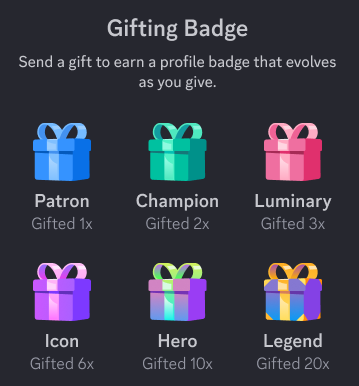 |
| Legacy Username |  |
| Bug Hunter |  |
| Golden Bug Hunter |  |
| Discord Staff |  |
| HypeSquad Events |  |
| HypeSquad Bravery |  |
| HypeSquad Brilliance |  |
| HypeSquad Balance |  |
| Moderator Program Alumni |  |
| Early Supporter |  |
| Partnered Server Owner |  |
| Last Meadow Online |  |
Current Discord Badges You Can Earn
The most realistic badges come from using Discord normally, supporting a server, or completing official activities. They are not rare in a collector sense, but they are real profile milestones.
Discord Nitro Badge
The Nitro badge appears when you have an active Nitro, Nitro Basic, or Nitro Classic subscription. When someone hovers over it on desktop, Discord shows the date your subscription started.
Discord introduced evolving Nitro badges in 2026. The badge updates automatically as your continuous Nitro membership reaches new milestones. You do not need to claim a new badge every time it changes.
Nitro Credits are a small but important exception. Nitro Credits can give temporary Nitro access, but Discord says they do not include the Nitro profile badge, the two included boosts, boost discounts, or Share Nitro. If your goal is specifically the badge, regular Nitro, Nitro Basic, or an active Classic plan is what matters.
If you are deciding whether a subscription is worth it beyond the icon, see our Discord Nitro features ranked guide.
Server Booster Badge
The pink Server Booster badge means a user is currently boosting at least one server. Its design evolves the longer someone boosts without a break.
There are two details people often miss:
- If you stop boosting every server, the boost streak resets to the first badge level.
- If you boost multiple servers, Discord shows the longest continuous boost streak rather than combining all boost time together.
This is a badge you earn through ongoing support, not a one-time purchase. The server benefits from boosts too, including more emoji capacity and, at certain levels, banners and role icons. Our Discord Server Boosts guide explains what each boost level unlocks.
Discord Quests Badge
Complete a Discord Quest and Discord adds the Quests badge to your profile. Quests are official in-app activities that can involve playing or streaming an eligible game, watching content, or completing another campaign-specific goal.
To look for one, open Discover > Quests on desktop or browser. On mobile, open your profile, then go to Settings > Quests or tap the Orbs balance when it appears. Always accept a Quest before doing its task, read the timer and requirements, then claim the reward after you finish.
One small warning: Discord currently says the Quests badge cannot be removed from your profile. Do not complete a Quest purely for the badge unless you are happy to keep it there.
Orbs Badge
The Orbs badge is a profile item you can buy from the Orbs Shop. Discord Orbs are earned from eligible Quests and can be spent in Discord’s Shop on qualifying items, including an Orbs-exclusive badge, profile cosmetics, and Nitro Credits.
The Orbs badge is also permanent once claimed. Discord says it cannot currently be removed from the profile, so treat it like a collectible you choose intentionally rather than a temporary decoration.
For the full earning and spending flow, including where to find Quests on each device, read our Discord Orbs guide.
Gifting Badge: A Limited Experiment
Discord’s current badge guide also mentions a Gifting Badge experiment. It is available only to select users. If the experiment is enabled for your account, the badge tracks eligible Nitro and Shop gifts you have sent and evolves as you gift more.
There is no setting or application that turns this on. If you do not see it, you are simply not in the experiment. Do not pay a stranger who claims they can add it to your account.
Legacy Username Badge
The Legacy Username badge is not an achievement new accounts can earn. It identifies eligible users who kept an old Discord username and discriminator during Discord’s username change.
Unlike most badges, eligible holders can choose whether to display it. On desktop, go to User Settings > Profiles and turn off the Legacy Username Badge toggle. On mobile, open You > Edit Profile and use the same toggle.
Rare and Staff-Only Badges
Some badges reflect a specialized contribution or employment relationship. They are not regular rewards, so be suspicious of anyone selling access to them.
Bug Hunter and Golden Bug Hunter
Discord awards Bug Hunter badges to people who actively participate in the Discord Testers community. There is also a Golden Bug Hunter badge for testers who reach the highest level through sustained, high-quality work.
This is not the same thing as submitting a normal support ticket. Discord specifically says that reporting a bug through the Support Portal does not count toward the badge. If you want to contribute, join the official Discord Testers community, learn how its testing and reporting process works, and focus on useful, reproducible reports.
Discord Staff Badge
The Staff badge is for Discord employees. It is not an application prize, a moderation badge, or a reward for being active in a large server. Anyone offering it for money is trying to scam you.
Legacy Discord Badges You Cannot Get Anymore
Legacy does not mean fake. These badges are real, but their earning windows or programs ended. The right answer to “How do I get one?” is often “you cannot now.”
HypeSquad Events and House Badges
The HypeSquad Events badge belonged to people who attended or organized official HypeSquad events. It is no longer obtainable.
The three HypeSquad House badges, Bravery, Brilliance, and Balance, came from an in-app quiz. Discord retired that quiz. You cannot newly join a house, and existing holders cannot remove the badge from their profiles.
Moderator Program Alumni
The old Certified Discord Moderator badge evolved into the Moderator Program Alumni badge for people who took part in Discord’s moderation-program ecosystem before December 1, 2022. It is no longer obtainable.
That does not mean moderation skills are closed off. You can still build a useful moderation system in your own community. Our server permissions audit checklist is a practical place to start.
Early Supporter
Early Supporter is one of the most recognizable legacy badges. Discord gave it to people who purchased Nitro before October 10, 2018, when Discord changed its Nitro offerings. It cannot be earned now.
There is no grandfathering trick, no “old Nitro code,” and no subscription length that will convert a new account into an Early Supporter.
Partnered Server Owner
The Partnered Server Owner badge was tied to Discord’s former Partner Program path for eligible communities and creators. Discord’s current badge guide lists it as no longer obtainable.
Building a healthy community is still worthwhile, but do it because your members enjoy it, not because someone promises a badge. If you are working on discovery and retention, our Discord server onboarding guide can help with the part members actually feel.
Last Meadow Online
The Last Meadow Online badge was a limited event reward available from April 1 through April 7, 2026. It is now legacy. Seeing one means the holder took part during that short event window, not that they found a hidden game link later.
What About Active Developer and Verified Bot Developer?
You may see older articles list Active Developer or Verified Bot Developer alongside today’s badges. Discord’s July 2026 Profile Badges guide does not list either as a currently obtainable profile badge.
That is why this guide does not tell readers to build a bot or hit an old eligibility target in exchange for a badge. Build a Discord app because you want to make something useful, not because a stale list promised profile flair. If you do want to make a bot, our Discord.js beginner guide shows the current first steps.
How to Spot Fake Badge Offers
Badge collectors are an easy target because legacy badges look exclusive. Protect your account with a few simple rules:
- Do not buy, trade, or rent Discord accounts for badges.
- Do not scan a QR code to “verify” a badge claim.
- Do not paste your token into a badge tool or bot.
- Do not give anyone your login details or backup codes.
- Do not trust screenshots as proof that a seller can add a badge.
Discord badges stay attached to the account that earned them. Someone cannot safely move an Early Supporter, Staff, or HypeSquad badge to your account. If they say otherwise, the likely goal is your account.
Final Takeaway
The best Discord badges in 2026 are the ones you can earn honestly:
- Complete a Quest for the Quests badge.
- Earn Orbs and claim the Orbs badge if it is worth the cost to you.
- Keep Nitro or a Server Boost active if you already value the subscription or perk.
- Contribute seriously through Discord Testers if bug hunting interests you.
The rest are history, not hidden unlocks. That makes them interesting, but it should also make you extra careful around anyone offering a shortcut.
Sources Checked
Reviewed on July 17, 2026:
Share this article
Related Articles
How to Get Free Discord Decorations in 2026
Get free Discord decorations, nameplates, and profile effects with NitroLoot, Quests, Orbs, and gifts. Compare the effort, availability, and ownership rules.
How to Make Your Discord Profile Festive for Christmas
Give your Discord profile and server a warm Christmas makeover with festive avatars, banners, themes, and community ideas that feel cozy!